
Texts
Text messages from Eeda
Eeda texts pros who ask for it, and sends one-time codes: to confirm a member’s cell number, and to a listed business’s phone when someone asks to claim or remove its page. Here is what we send, how you agree, and how to stop.
Last updated: October 28, 2026
Who sends them
Eeda, a directory of local pros, is run by JAD Technologies LLC, a Michigan limited liability company doing business as Eeda. Eeda sends these texts from its own toll-free number, (877) 460-5088, through our texting provider, Twilio. Every text about a pro’s page starts with “Eeda:”. Nobody at Eeda reads replies to these texts; to reach a person, email or call us (below).
Texts a pro can choose to get
A pro with an Eeda page can choose to get texts about it. They are off until the pro turns them on, and nothing needs them: the app shows the same kinds of news (its page numbers cover the last 7 and 30 days).
- Once a month, on the 1st, while the pro’s page is live: how many views the page had last month (each phone counts once a day), and how many times Call or Text was tapped on it. For example: “Eeda: Your page in September: 214 views, 9 calls, 6 texts. Open the Eeda app for more. Reply STOP to opt out.”
- When a customer sends a booking request: the day, the time and the service, never the customer’s name. For example: “Eeda: New booking request for Tue, Oct 20, 9 AM to 11 AM (Drain cleaning). You have 8 hours to answer in the Eeda app. Reply STOP to opt out.”
- When a person at Eeda approves the pro’s page (“Eeda: Your page is live. Customers can now find you on Eeda. Reply STOP to opt out.”), or asks for a change to it (“Eeda: A person at Eeda asked for a change to your page. Open My page in the Eeda app to see what to change. Reply STOP to opt out.”).
The first time these texts can reach the pro — once they have said yes and confirmed their number — one text says so: “Eeda: You're now opted in to texts about your Eeda page: monthly stats, booking requests and page updates. Msg frequency varies. Msg & data rates may apply. Reply HELP for help, STOP to opt out.”
How often: it varies — one a month for the page numbers, plus one for each booking request and each decision about the page.
How a pro agrees (the opt-in, step by step)
Texts about a page are opt-in, and the yes is the pro’s own: nothing on the sign-up form or in the app needs it, it is never ticked for them, and it is a separate box from the one where they agree to the Terms of Service and the Privacy Policy. There are two places to say yes, both in the Eeda app for iPhone:
- When a pro creates their account. On the “Create your pro account” screen, under the boxes for the business and the login and the line about the free months, a section headed “Texts about my page (optional)” shows an unticked box labelled “Text me about my page: monthly stats, booking requests, page news.” and, right under it, the full words below. A pro who wants the texts ticks the box, then taps “Create my account”. A pro who leaves it unticked is not texted about their page (unless they turn the switch on later, below).
- Later, on the Account tab of a pro account. The switch “Texts about my page” is off until the pro turns it on; the same full words sit under it, with a line saying where things stand (on, off, or waiting for the number to be confirmed). Turning the switch on is the same yes; turning it off stops the texts.
The words under the box’s line and under the switch, exactly as the app shows them:
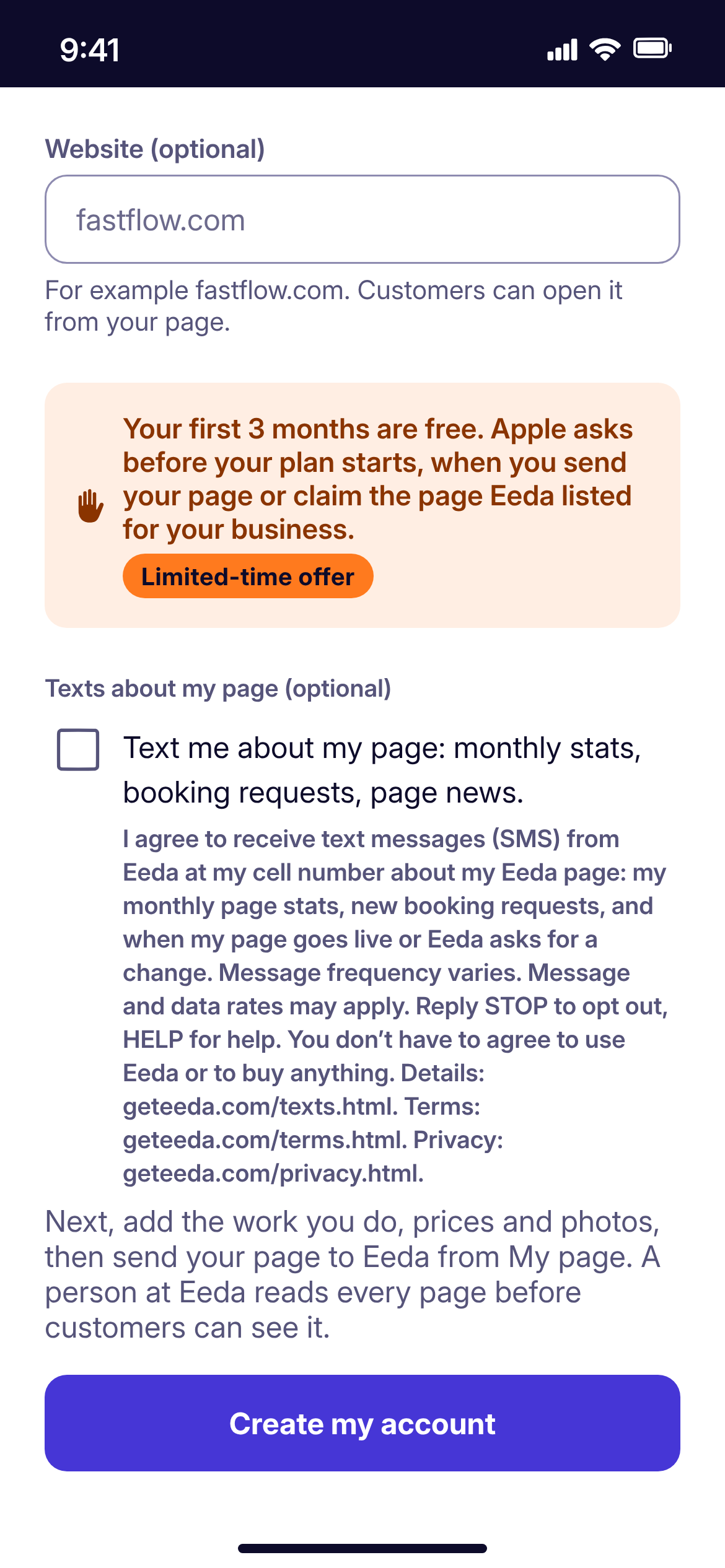
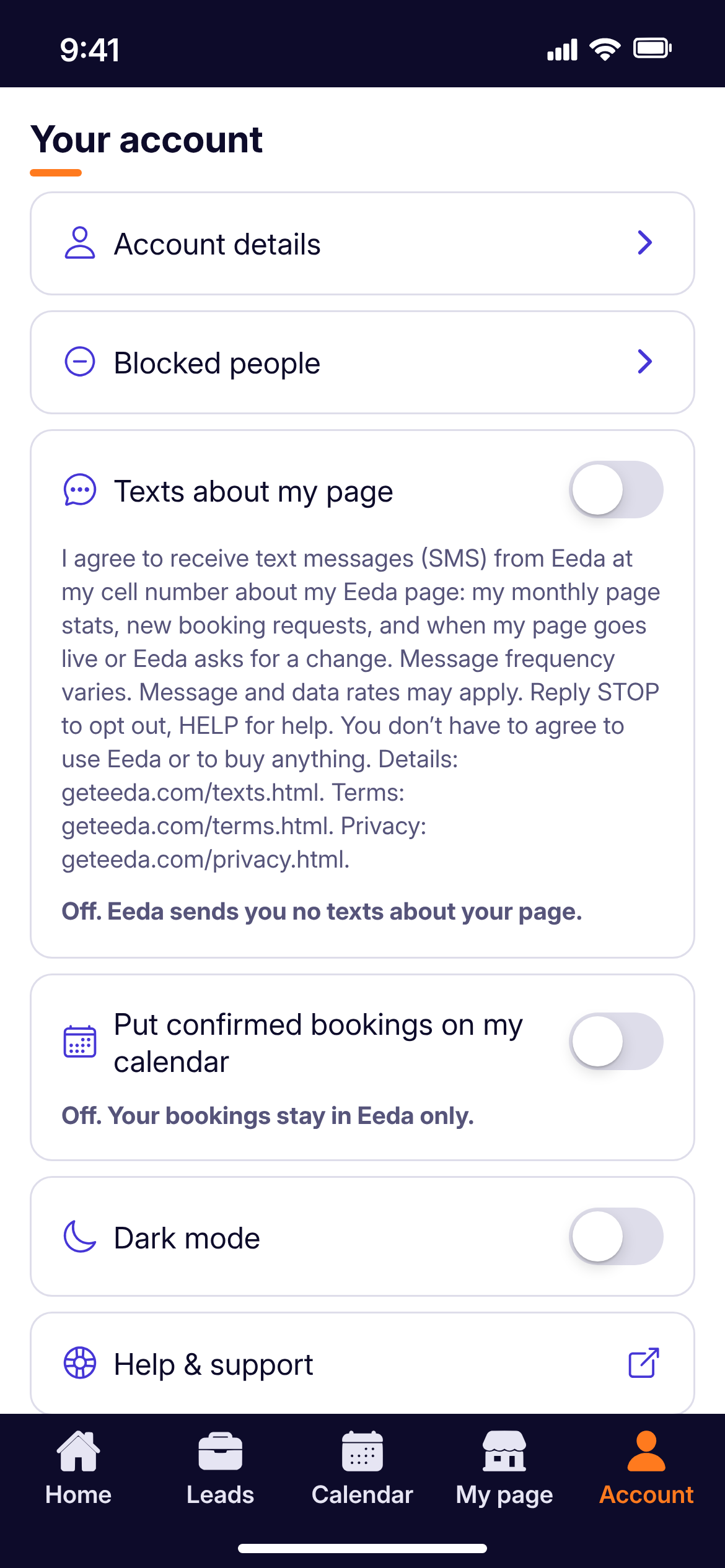
What happens after the yes. First the number is confirmed. Before any text about the page goes out, Eeda sends a one-time 6-digit code by text to the pro’s cell number (from our texting provider’s code service, which may use a different number from Eeda’s own), and the pro types it in on the “Confirm your cell number” screen, described below. So texts can only reach the phone that number belongs to. Then, the first time the texts can reach the pro — the yes given and the number confirmed — Eeda sends the one text saying they are opted in (its words are above), and from then on only the texts listed above. With the account, Eeda keeps the words the pro saw, the date of those words, the moment they agreed, and where (the sign-up box or the Account tab).
The one-time code that confirms a cell number
Eeda texts a 6-digit code to a cell number on an Eeda account, and the person types the code in the app. That shows the number is really theirs. The code is sent when the app asks the person to confirm their number — after a number is added or changed, or the first time an account made before codes began opens the app — or when they tap “Send a new code”. It comes from our texting provider’s code service, which may use a different number from Eeda’s, and it is used only to confirm the number.
The same code service sends a 6-digit code to the phone number on a page Eeda listed, when someone asks to claim that page in the app (“Is your business already on Eeda? Find it”) or to remove it (“Remove this listing”, in the app or at geteeda.com/remove-listing.html). It goes as a text, or, when the number cannot take texts, as an automatic call that reads the code aloud. It is sent only when someone asks for it, at most eight times a day for one page (three to claim it, and five to remove it, in the app and on the website together), never by an automatic call to a number that replied STOP, and it is used only to show that the person answers that business’s phone.
Businesses that ask to be listed, and businesses Eeda listed
A business can ask to be listed with the short “List my business” form on geteeda.com. Its box reads: “A person at Eeda may call, text or email me about listing my business. I have read the Privacy Policy.” Eeda’s own number, (877) 460-5088, sends that business nothing; a person at Eeda may call or text it from their own phone, or email it, about listing the business.
With a business’s agreement — given to a person at Eeda by phone, in person, by email or by text — Eeda may list its page before the pro has an account. Eeda may also list a business’s page from public business information. Eeda sends a listed business no text of its own — not from (877) 460-5088, and not from any other number — apart from the code above, when someone asks for it. A person at Eeda may call a listed business about its page, or text it from their own phone when the business agreed to be contacted; and when Eeda has the business’s email address, it may email it about the page once a month, with a link to stop. Once the pro has taken charge of the page in the app, the texts above are theirs to turn on.
How to stop, and how to get help
Reply STOP to any text from (877) 460-5088 and Twilio stops every text from that number to your phone at once. The next time Eeda would have texted you, the app turns your “Texts about my page” switch off too. To get texts again, text START to (877) 460-5088, then turn the switch back on. You can also turn the switch off on the Account tab at any time.
Reply HELP for help, or email support@geteeda.com, or call (248) 509-4399 (a voicemail line).
Message and data rates may apply, depending on your phone plan. Carriers are not liable for delayed or undelivered messages.
Your number
We use your cell number to send the texts you asked for and the code that confirms it, and our texting provider (Twilio) handles the number only to deliver them. We do not sell your number, and we never share it, your agreement to get texts, or the record of that agreement with anyone else for their own marketing. The Privacy Policy (geteeda.com/privacy.html) says more, and the Terms of Service (geteeda.com/terms.html) cover the texts too.
Questions?
Email support@geteeda.com and a founder will reply.
JAD Technologies LLC
43313 Woodward Ave #1006, Bloomfield Hills, MI 48302